Recommendations
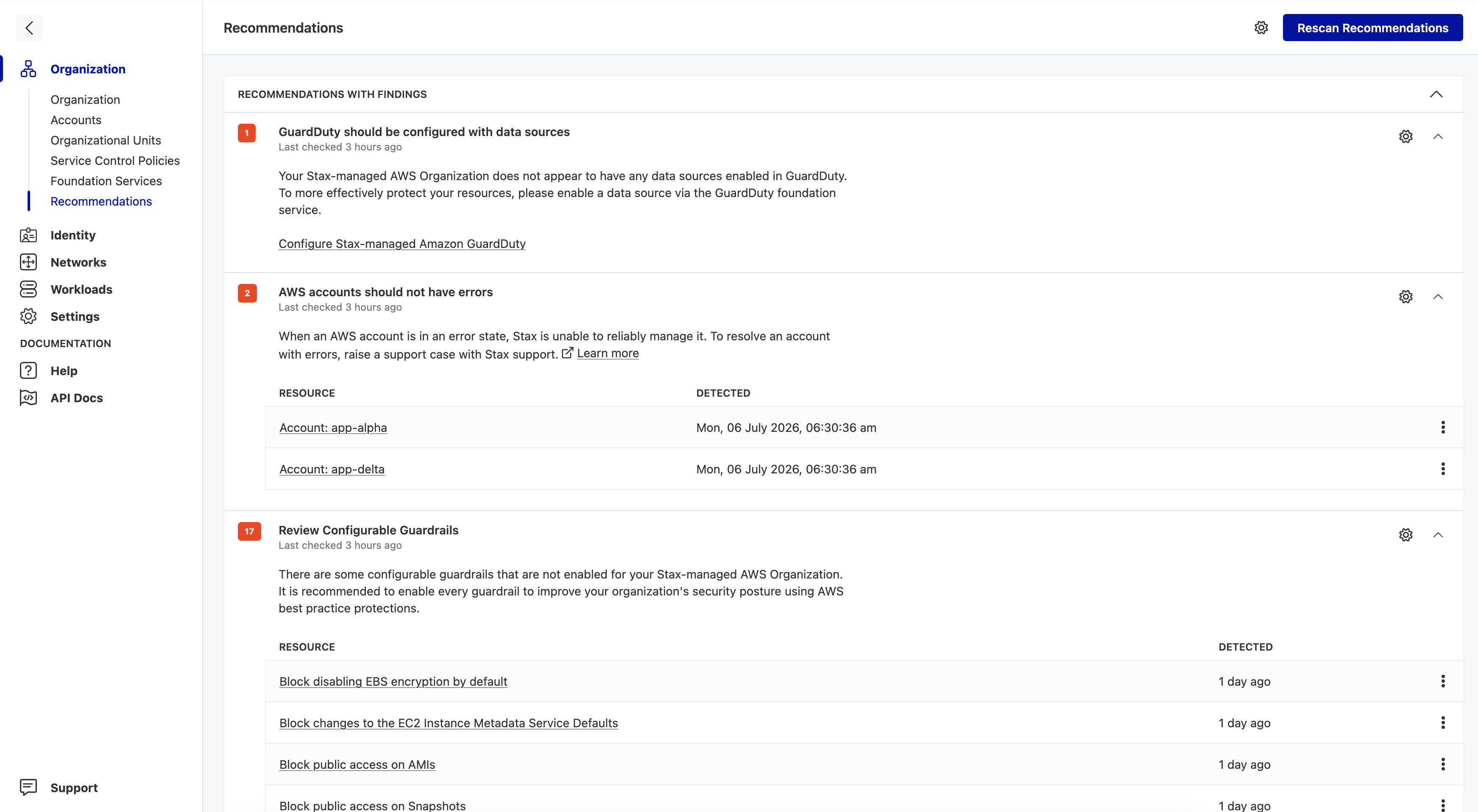
The Recommendations page is a simple way to receive guidance from Stax on sensible steps to take to harden and secure your AWS Organization using features available in Stax. On the Organization page, Stax will show you a selection of the highest priority recommendations. For a more detailed breakdown, visit the Recommendations page, under Organization in the left-hand nav, and review all your Organization's recommendations in detail. Here, you can also archive and un-archive recommendations that you may have a business reason not to comply with. This helps to minimise noise and ensure that your team is only exposed to recommendations that are able to be actively addressed.
Accessing Recommendations
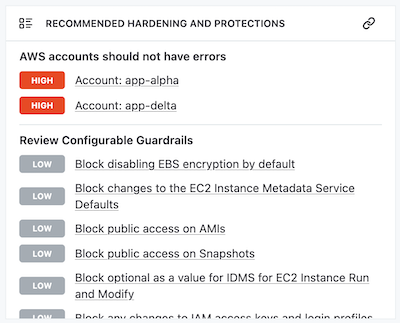
High priority recommendations are available in the Recommended Hardening and Protections pane on the Stax Console's Organization page.
To view all Recommendations for your Stax-managed AWS Organization, choose Recommendations under the Organization heading in the left-hand nav. The Recommendations page shows all Recommendations for your Organization, including guidance on how to remediate the given Recommendation.
How Recommendations are collected
Recommendations are evaluated for your AWS Organization daily. If you perform a remediation and want to re-evaluate the Recommendations for your Organization, you can do so by choosing the Rescan Recommendations button at the top of the Recommendations page. This will trigger a re-evaluation which will display on your Recommendations page within a few minutes.
Dismissing and Excluding Recommendations
If there is a Recommendation your organization elects not to comply with, you can disable evaluation of that recommendation entirely. Choose the settings cog beside the recommendation then deselect Enabled and select Save. To re-enable the Recommendation again, expand Disabled recommendations at the bottom of the page and re-enable it via the settings cog.
Additionally, you can exclude individual resources/findings for a given Recommendation. To do this, simply choose the vertical ellipsis (⋮) beside a given finding, and select either Dismiss for 24 hours or Exclude as appropriate.
Recommendations Definitions
The following Recommendations are available in Stax:
AWS Accounts should have alternate contacts set
Ensure all AWS Accounts have alternate contacts configured for Billing, Security, and Operations contacts. You can configure these using AWS Accounts within Foundation Services.
See more details at Update AWS Account Contact Details.
AWS Accounts should not have errors
When an AWS account is in an error state, Stax is unable to reliably manage it. To resolve an account with errors, raise a support case with Stax support.
See more details at Account Statuses.
Block public sharing of S3 resources
S3 buckets, access points, and objects can be misconfigured to allow public access. Your Stax-managed AWS Organization can be configured to prevent any possible misconfiguration on S3 resources managed by the organization.
See more details at Configure AWS Accounts.
Block public sharing of EC2 resources
EBS volumes, snapshots, and AMIs can be misconfigured to allow public access. Your Stax-managed AWS Organization can be configured to prevent any possible misconfigurations on EC2 resources managed by the organization.
See more details at Configure AWS Accounts.
GuardDuty should be configured with data sources
Your Stax-managed AWS Organization does not appear to have any data sources enabled in GuardDuty. To more effectively protect your resources, please enable a data source via the GuardDuty Foundation Service.
Review Configurable Guardrails
Best-practice configuration is to enable all Configurable Guardrails provided by Stax. This Recommendation is displayed when one or more of these are not enabled. Consider enabling the Guardrail(s) in question, or otherwise excluding individual findings from this Recommendation to ensure you're notified in future if new Guardrails are made available or if configuration lapses.
See more details at Configurable Guardrails.
Security Hub standards should be enabled
Your Stax-managed AWS Organization does not appear to have any standards enabled. To ensure that your organization has appropriate security hardening, it is recommended that you enable at least one standard in Security Hub.
See more details at Using Stax-managed Security Hub.
Stax-managed Organization has all default regions enabled
Your Stax-managed AWS Organization may be susceptible to undesired access and usage in regions not used by your organization. To prevent this, it is highly recommended to deactivate all regions your organization is not using.
See more details at Using Stax-managed AWS Regions
Stax Foundation Services should not have errors
When a Stax Foundation Service is in an error state, your Stax-managed AWS Organization may be at risk of incomplete configuration, incorrect access controls, or missing security hardening and monitoring. To resolve a Foundation Service with errors, raise a support case with Stax support.
See more details at Raise a Support Case.
AWS Accounts with default VPC
It is best practice to remove the default VPC from AWS Accounts. Consider removing the default VPC from any accounts and regions where the recommendation findings were raised.
Multiple AWS CloudTrail trails exist in AWS Account
The first copy of management events within each region is delivered free of charge. Creation of additional CloudTrail trails can incur significant costs for AWS accounts. Consider removing unneeded secondary CloudTrail trails.
See more details at Managing Cloudtrail trail costs.
Root user credentials found
Root user credentials have been detected in your Stax-managed AWS Organization. It is recommended that your organization uses centralized root access as a security best practice.
See more details at Centralized root access for member accounts.